Appli Drive
- For the toy based on this item, see here.
| |||||||
 Sorry for our appearance, but this article currently needs a lot of work.
| Appli Drive | |
|---|---|

| |
| Kanji/Kana | アプリドライヴ |
The Appli Drive (アプリドライヴ, Apuri Doraivu; Dub: App Drive) is a device used by human characters paired with Appmon in Digimon Universe Appli Monsters.
Functions[edit]
Anime/Manga[edit]
- Appliarise a Standard-grade Appmon Chip into an Appmon.
- Super Appliarise a Super-grade Appmon Chip into a Super Appmon.
- Ultimate Appliarise an Ultimate-grade Appmon Chip into an Ultimate Appmon, with a 60-second time limit.
- Applink two Appmon through their Appmon Chips.
- AppGattai two compatible Appmon into an Appmon of a higher Grade, whether from Standard to Super or from Super to Ultimate. In the case of an Ultimate, the resulting form is limited to 60 seconds.
- Turn a defeated Appmon into an Appmon Chip.
- Access the AR-Field.
- Contact and be contacted by Minerva and Shinkai Denemon.
- Be able to see non-Appliarised Appmon.
- Use a unique Appmon-specific function determined by the user's Buddy Appmon.
Video Games[edit]
- Appliarise an Appmon Chip into an Appmon.
- Applink two Appmon through their Appmon Chips.
- AppGattai two compatible Appmon into an Appmon of a higher Grade. Depending on the situation, the AppGattai may be temporary or permanent.
- Within a Chaos Gate, individual Appmon can hijack Appli Drives, allowing them to perform AppGattai without the need of an Appli Driver.
- Access the AR-Field, including the Cyber Arena.
- Return from the AR-Field to the Real World. However, this cannot be done while in a Chaos AR-Field.
- Enter and exit Chaos AR-Fields with the Chaos AR app.
- Enter AR Dungeons, be it from the Real World or from the AR-Field.
- Be able to see non-Appliarised Appmon.
- Perceive Appli Drivers and Appmon in the AR-Field from the Real World as distortions, as well as AR Dungeons.
- Menu functions, detailed below.
Owners[edit]
| Manga Appli Drives | ||||
| Owner | Color/Pairing | Question | Chapter | Notes |
|---|---|---|---|---|
| Shinkai Haru | Red GATCHMON |
Are you a protagonist? (あなたは主人公ですか?, Anata wa shujinkou desu ka?) YES |
"Protagonist Launch!!" | Evolved by Shinkai Denemon using Minerva's data into an Appli Drive DUO in "Cage!!". |
| Karan Eri | Blue DOKAMON |
Do you want to make someone smile? (誰かを笑顔にしたいですか?, Dareka wo egao ni shitai desu ka?) YES |
"Determination Install!!" | Evolved by Shinkai Denemon using Minerva's data into an Appli Drive DUO in "Overdrive!!". |
| Asuka Torajirou | Yellow MUSIMON |
Are you feelin' it? (ノレる?, Noreru?) YES |
"Link!!" | Evolved by Shinkai Denemon using Minerva's data into an Appli Drive DUO in "Overdrive!!". |
| Katsura Rei | Black HACKMON |
Are you alone? (あなたは一人ですか?, Anata wa hitori desu ka?) NO |
"Link!!" | Evolved by Shinkai Denemon using Minerva's data into an Appli Drive DUO in "Cage!!". |
| Unryuji Knight | Unknown | Unknown | "Overdrive!!" | |
| Game Appli Drives | ||||
| Owner | Color/Pairing | Question | Notes | |
|---|---|---|---|---|
| Kazuki / Itsuki | White ONMON |
Do you want to connect? (あなたはつながりたいですか?, Anata wa tsunagari tai desu ka?) YES |
||
| Naoto | Grey OFFMON |
|||
| Makoto | Brown YADOMON |
|||
| Wakaba | Unknown GASHAMON |
|||
| Ouji | Unknown OUJAMON |
|||
| Yukari | Unknown AIDMON |
|||
| Ryouji | Unknown KOSOMON |
|||
| Mio | Cyan TUTOMON |
None | Taken from Jammingmon. | |
| Kayo | Unknown COPIPEMON |
|||
| Kagefumi | Unknown CRAFTMON |
|||
Appearances[edit]
Anime[edit]
Digimon Universe Appli Monsters[edit]
In Digimon Universe Appli Monsters, each Appli Drive is delivered to a chosen human by an everyday machine and appears in a unique form. Before it can be activated, the recipient must answer a question posed by the device. If the answer is correct, the Appli Drive unlocks, establishes a bond between the human and their Buddy Appmon, and causes an Appmon Band to appear on the user's wrist. The Appmon Band can hold Appmon Chips and communicate with other Appmon Bands.
The Appli Drive serves as the primary tool used by Appli Drivers to Appliarise Appmon, perform Applinks and App Gattai, generate Appmon Chips from defeated Appmon, communicate with Minerva and Shinkai Denemon, access the AR-Field, and perceive non-materialized Appmon.
In addition to these standard functions, every Appli Drive possesses a unique ability tied to the characteristics of its user's Buddy Appmon. Shinkai Haru's Appli Drive allows him to enter search terms that activate Gatchmon's "Deep Search" and DoGatchmon's "Deep Dive". Karan Eri's Appli Drive can generate a game controller-like interface that enables Dokamon's "Dokadoka Rush". Asuka Torajirou's Appli Drive creates a holographic DJ console used in conjunction with Musimon's abilities. Katsura Rei's Appli Drive generates a pair of holographic keyboards that allow him to make use of Hackmon's hacking capabilities and Raidramon's "Barrage Jack".
The methods by which the main Appli Drivers receive their Appli Drives differ. Haru's Appli Drive appeared through a vending machine and asked him whether he wanted to be the protagonist. Eri received hers from a UFO catcher machine, which asked whether she wanted to make people smile. Torajirou's emerged from the package of a delivery drone and asked whether he wanted to follow his heart. Rei's was delivered in the shopping bag of a robotic cashier and asked whether he was lonely.

Manga[edit]
Digimon Universe Appli Monsters[edit]
Shinkai Haru obtained his Appli Drive from a vending machine in "Protagonist Launch!!". The other Appli Drivers all appear with their Appli Drives already owned, and how they obtained them is not shown. However, as explained by Shinkai Denemon in "Overdrive!!", they were all given to them by Minerva.
Unryuji Knight also owns an Appli Drive of his own, but it's a copy created by and given to him by Leviathan. Nonetheless, it has the same functions as Minerva's Appli Drives.
The heroic Appli Drivers' Appli Drives, alongside Oozora Yuujin's Appli Drive DUO, were surrendered to Knight, Fakemon and Beautymon in "Cage!!" in exchange for Katsura Hajime's data, though they did not uphold their end of the deal. Instead, Timemon replaced them with dummies, and the real ones were given to Denemon, who evolved them using Minerva's data into Appli Drive DUOs, given to Haru and Katsura Rei in "Cage!!", then to Karan Eri and Asuka Torajirou in "Overdrive!!"
Video Games[edit]
Digimon Universe Appli Monsters/Cyber Arena[edit]
Kazuki/Itsuki obtained their Appli Drive from a vending machine close to the Cyber Arena after Naoto rejected their attempt to connect with them at the beginning of the game. After returning home, the Appli Drive connected to their smartphone and downloaded the Online App against their will, which then Appliarised into their Buddy Appmon, Onmon.
Jammingmon planned to share Appli Drives with other humans that didn't know about Appmon and wanted to do bad things so they'd cause total chaos. However, he'd end up losing his Appli Drive to Recomon's jamming signal, led by Tutomon, allowing Mio to take it instead and making her an Appli Driver with Tutomon as her Buddy Appmon.
The Appli Drive serves as the menu of the game. The top screen of the menu shows the player's name, selected avatar (Kazuki or Itsuki), level, EXP, HP and DMG bonus, Appmon count, money, Fusion Rocks, Buddy Appmon, and remaining and maximum Battery. The lower screen serves as the proper menu, with eight different options, which may open further submenus:
- Appmon:
- Appmon List: shows the Appmon Chips the player currently owns.
- Appmon Enhancement: sacrifice Appmon Chips to increase an Appmon's Version.
- AppGattai: permanently combine two Appmon Chips into an Appmon Chip of a higher Grade. Only AppGattais that have already been done in-battle can be done in this menu.
- Convert Appmon Fragments: convert 100 Fragments of a specific Appmon into their Appmon Chip. Unlike other games such as the Digimon Story series, no more than 100 can be used at a time.
- Appmon Index: shows profiles and AppGattai information on Appmon. Appmon the player has obtained will show their full information, while those they have only seen as well as AppGattais performed only in battle will only show their model. The profiles used are identical to those in the Appmon Chip Reference Book and the Appmon Reference Book.
- Deck: allows the player to check their Appli Decks. An extra menu opens once one's selected:
- Edit deck: adds or removes Appmon Chips from the deck. After doing it, the player is forced to select their Buddy and Favourite Appmon.
- Set as Main: selects the deck as the one that will be used for battles. If the deck is already the Main, this option will be greyed out.
- Rename: lets the player give a different name to the deck. The default name is "Appli Deck (number)".
- Copy Deck: creates a copy of the deck in another slot.
- Delete Deck: deletes the deck. If the deck is the Main, this option will be greyed out.
- Set Buddy & Favourite: lets the player select a Buddy Appmon and four Favourite Appmon. These will have a higher chance to be drawn in the opening hand of a battle.
- Quests: check the player's current main and sub quests.
- QR Code: lets the player scan a real-life QR Code, gaining items or a new Appmon Chip from it. Up to six QR Codes can be scanned per day.
- Save: saves the game.
- Items: lets the player check and use their items. Items that cannot be used are greyed out.
- Tutorials: lets the player check their already-viewed tutorials. Tutomon is shown in the top screen during this menu as they're the one who give said tutorials. Not all tutorials can be seen in this menu, as some are only given by MCmon in the Cyber Arena.
- Options: Battle Status, Battle Animations, Battle Comments, Menu Animations. All are Yes/No options except Battle Comments, which has an extra "no enemy" option.
In-battle, the Appli Drive is used to Appliarise and Applink Appmon, as well as use Appmon Chips for Appli Skills. Furthermore, the Appli Drive's Battery serves as the player's HP and any damage taken by their Appmon is translated into Battery damage for the Appli Drive. The Battery gauge hitting zero is a game over. The Battery does not recharge on its own and must be recharged by talking to Batterimon in the overworld. The Appli Drive is also used as part of the game's HUD: a red Appli Drive cover serves as the loading screen when moving between the Real World and AR-Field, as well as between any overworld and the menu; and red and blue Appli Drive covers are used to denote the player's and opponent's respective HP and Battery gauges.
Appli Monsters: Protect the World[edit]
Virtual Pets[edit]
Appli Drive[edit]
Arcade Games[edit]
Appmon Gatchinko Bingo[edit]
Data Carddass Appli Monsters[edit]
Miscellaneous[edit]
Super Evolution Item Metal Charms[edit]
A metal charm modeled after the Appli Drive was included in a collection of ten designs based on items from the Digimon anime series, first sold at DigiFes 2019.[1]
TCG[edit]
| Appli Monsters Card Game | |
| |
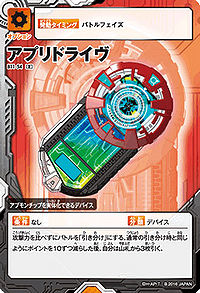

Digimon Card Game[edit]
While the Appli Drive doesn't have a card of its own in the Digimon Card Game, it is shown alongside the Appli Drivers in some of their cards.
| Card number | Card name |
|---|---|
| BT21-084 (parallel) | Shinkai Haru |
Image Gallery[edit]
|
 |
 |

|
| Haru's Appli Drive | Kazuki/Itsuki's Appli Drive | Appli Drive (reference art) |
Haru's Appli Drive (reference art) |
 |

| ||
| Eri's Appli Drive (reference art) |
Astra's Appli Drive (reference art) |
In-game Graphics[edit]
 |

|
| Appli Monsters: Protect the World | Appli Monsters: Protect the World |

